TRANSLATE THIS BLOG!!!

English French German Spain Italian Dutch Russian Portuguese Japanese Korean Arabic Chinese Simplified
Showing posts with label Tips for your iPod. Show all posts

Wednesday, 25 January 2012

Barrel animations

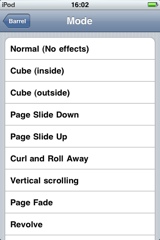
Barrel is another great aplication you will be able to find in Cydia. It allows you to define with what animation you change pagea in your iPods homepage just as you see in the images.

Once you have downloaded it to set it up is VERY simple. Simply acces your setting where you will find a new cattegory called Barrel. Open it and then simply define which application you desire to use.

Tuesday, 17 January 2012

Protect your aplications with Lockdown Pro

Everyone has something in their iPods that wants to keep private or protect from other people. It can be music, videos notes or any other application but we bring you the solution, Lockdown Pro.

This application will allow you to set passwords to any application or folder in your iPod. Once you download it from Cydia (If you don't find it check our post on repositories here as you may have to add iphoneame) follow this steps to set passwords:

First you must acces to a new section that has been created in your settings called lockdown Pro. (as shwon in the image) the first time you access it it will ask you which password you want to set. It will also ask you for a safety question in case you forget the password.

Once in the settings you can change the password, safety word, applications locked or not and many more options.

You can also lock applications from the menu itself. Just hold an icon until all start moving, as when you move them, at it's lower right corner a grey lock appears. Click on it and it will ask you for the password you have set. Once you enter it the application will be locked and the lock will turn red. Repeat the process to unlock the application.

Sunday, 15 January 2012

Adding repositories (Sources)

As explained in older posts, Cydia allows you to install in your iPod / iPhone / iPad thousands of applications not found in app store. No to obtain many of these applications we will have to add to Cydia different REPOSITORIES, sources where to download this applications. This is as if we were telling Cydia to look on different types of app stores which contain different apps. Some of the best examples of repositories are Hackulo and Iphoneate.

Here is a short guide on how to add a repository:

First access the section on Cydia which is named MANAGE and there click on sources

Then click on edit on the upper right corner and then in the upper left corner to add.

You should then see this page, add the direction of the repository and wait till the process ends.

It is highly recommendable for you to add the following repositories as many applications already mentioned and which will be mentioned in further posts are contained in them:

http://cydia.hackulo.us/

http://iphoneame.com/repo/

Saturday, 14 January 2012

Manage ALL your ipod settings with ACTIVATOR


To maximize your experience with your iPod we recommend the application ACTIVATOR. this amazing application allows you to manage all of the button setting in your iPod. For example it will allow you to change the track you are listening by clicking boh of the volume bottons, pausing the song by holding one of the volume bottons etc etc..

This application is opensource, created by other iPod users. It is available in Cydia which was explained in this post. Just search for activator and install it for free. Here is a guide in how to use it to for example set that when you click the two volume buttons your track changes:

When opening activator you will see this page. In this menu you will be able to choose where you want the action to take place, for this example we would choose anywhere

Now it gives you to choose from a series of buttons or actions (as you see it is really very instinctive), now we would choose under the category of volume buttons, both press.

Finally we shall define the action we want to be taken when the buttons are pressed in this case it is next track under the category iPod.


As you can see activator gives us thousands of different combinations to personalize our iPod. We invite you to explore between the thousands of them and let us now through email (podmenmail@gmail.com) commentary or however you'd like your discoveries!

Tuesday, 20 December 2011

How to Obtain Cydia

To create a springboard and install cydia we have several programs we can use, depending on the software version of your iPod. To check what version your iPod is in follow this steps:

Settings > General  > About > Version    and there you will find a number similar to (4.2.1) or any other

Then here are several methods of obtaining the springboard and Cydia (click more):


DIRECTLY FROM YOUR IPOD USING JAILBRAKME: 
If your iPod is Version 4.0.1 or LESS you can jailbreak your iPod directly accessing the web http://www.jailbreakme.com/ and CAREFULLY following directions. This is the easiest fastest way of jail breaking your iPod.


USING REDSN0W:
The second solution we offer is using the redsn0w program. To jailbreak your iPod with this program you will need a computer. Although this jailbreak supports all versions, it is much more complicated and we do not recommend it if you do not have a reactively high technology knowledge. If you want to here is a complete tutorial on how to use it: http://www.idownloadblog.com/redsn0w/
Once using this program you identify the version you need of it please search for where to download it in google.

USING LIME RA1N:
This third solution offers an alternative program, simpler to redsn0w but sometimes less effective. We highly recommend it as it is easy to use. You can find all the information related to how to use it in this web: http://www.idownloadblog.com/2010/10/09/tutorial-jailbreak-iphone-limera1n/


Cydia

In an attempt to stop piracy, the Apple company strictly stopped users from accessing the some of the inner files of your iPod which control the functioning of the iPod. In this manner unless we break this barriers we are unable to modify inner configuration or insert contents which are not accepted by iTunes (for example other creators applications)

To break this barriers we must jailbreak our iPod and create a springboard, which is a second way of reaching the blocked content. The main purpose of this is to install Cydia. This application works as a second appstore where you can obtain (mostly for free) apps to modify the settings of the iPod such as Activator, WInterboard or SBsettings which will be mentioned in further posts.

In our next post will show how to obtain Cydia!!

Welcome to the HackYourIpod Section

Hi! Welcome to this section, where through a series of posts we wil help you master your iPods workings! Through several programs and applications we will show you how to obtain games for free, reprogram fixed aspects of your iPod such as changing the button settings to useful purposes like changing the song you are playing by pressing the 2 volume buttons.

If you wish to keep learning about how to obtain this awesome features please continue reading!